

GUIDE · VoiceStudio ·
Paying for ElevenLabs? There’s a free alternative
VoiceStudio clones a voice from a few seconds of recording, dubs videos and reads scripts with several voices. It runs on your own computer, so your recordings never go to the cloud, and the app costs nothing. This guide takes you from checking your computer to your first voice clone. You can install it yourself or hand the job to an AI agent.
- Time
- about 45 min
- Steps
- 7
- Cost
- $0



In this guide you will learn:
- whether your computer can handle VoiceStudio and how to check,
- where to download the installer from GitHub for Windows and Mac,
- how to have an agent install it: Claude Code, Cursor or Codex,
- what happens on the first launch,
- how to make your first voice clone and dub a video.
What you need
- Windows, Mac M1+, Linux
A computer
Windows 10 or 11 (64-bit), a Mac with an Apple processor (M1, M2, M3, M4…) and macOS 13.3 or newer, or Linux. On an Intel Mac the app cannot run locally.
Requirements ↗ - 16 GB RAM, 10 GB
Memory and disk
16 GB of RAM is enough for voice cloning. For dubbing videos 24 GB is better. The app and its models need about 10 GB of free space.
YouTube test ↗ - $0
VoiceStudio
Open-source software under the AGPL-3.0 license. The makers also sell a Pro version with a commercial license: $99 a year or $299 one-off.
GitHub ↗ - from $0
AI agent (optional)
If you would rather have an agent do the install: Claude Code comes with the Claude Pro plan ($20/month), Cursor has a free plan with limits, and Codex runs in ChatGPT, including the free plan with limits.
Claude pricing ↗
Step by step
Progress: 0 of 7
Step 1: Check that your computer can handle it
- Windows: open Settings → System → About. “Installed RAM” should be at least 16 GB and “System type” 64-bit.
- Mac: click the Apple menu → About This Mac. The “Chip” field must show an Apple processor, for example M1 or M3. Check the memory and the macOS version too (13.3 or newer).
- Free up about 10 GB of disk space. An NVIDIA graphics card speeds things up but is not required.
Tip:Without an NVIDIA card VoiceStudio runs on the processor alone, just slower. It then downloads a smaller package: about 5 GB instead of 9 GB.
Step 2: Windows: download and install
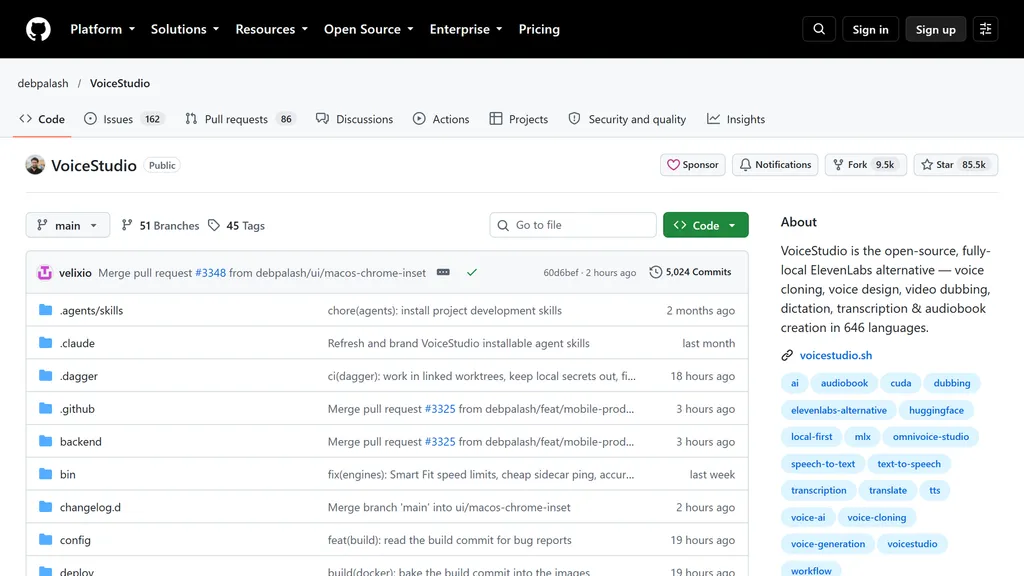
- Go to the VoiceStudio releases page on GitHub (the latest release).
- Scroll to the Assets section and click the file ending in
-win-x64.exe. At the time of writing it isVoiceStudio-Electron-0.5.6-win-x64.exe. - Run the downloaded file. The installer needs no administrator rights and lets you pick the folder, so you can install the app on a drive other than C.
- Prefer a single command? Open PowerShell (a regular one, not as administrator), paste
irm https://voicestudio.sh/install | iexand press Enter. The script picks the right installer, verifies it and opens the wizard.
Tip:If you want to be careful, compare the file’s checksum with
SHA256SUMS.txtfrom the same release. That proves the installer has not been tampered with.Step 3: Mac: download and install
- On the same releases page download the file ending in
-mac-arm64.dmg(todayVoiceStudio-Electron-0.5.6-mac-arm64.dmg). - Open the file and drag VoiceStudio into the Applications folder.
- If macOS says on first launch that it cannot verify the developer: in Finder, right-click VoiceStudio → Open and confirm Open. On macOS 15 Sequoia go to System Settings → Privacy & Security and click Open Anyway. You only do this once.
- Terminal alternative:
curl -fsSL https://voicestudio.sh/install | sh.
Tip:The
-mac-x64.dmgfile is for Intel Macs and only runs the interface, without local processing. On an Apple-processor Mac always takearm64.- On the same releases page download the file ending in
Step 4: Or have an AI agent install it
- The agent checks your computer, downloads the right installer, launches the app and makes sure it works. It follows the official instructions for agents written by the VoiceStudio team.
- Claude Code: install the Claude app from claude.ai/download, sign in (the Pro plan is required), click the Code tab and choose an empty folder, for example
voicestudio. - Cursor: install Cursor from cursor.com, open an empty folder and the agent chat panel.
- Codex (OpenAI): open Codex in the ChatGPT desktop app or in the Codex CLI and point it to an empty folder.
- Copy the prompt from the Prompt section, paste it and send it. When the agent asks for consent to run a command, read it and approve it.
Tip:The agent asks before downloading a model and tells you its size and license. It leaves the analytics question on first launch to you.
Step 5: First launch
- Open VoiceStudio. On first start the app downloads what it needs on its own: a Python environment, FFmpeg and the models. This takes a while, depending on your connection.
- The app asks whether it may collect anonymous statistics. Answer as you like. Everything works the same without consent.
- Stay with the default VoiceStudio engine. It supports more than 600 languages.
Tip:Running out of space on drive C? The app settings let you move data and models to another drive (Settings → Storage).
Step 6: Clone your voice
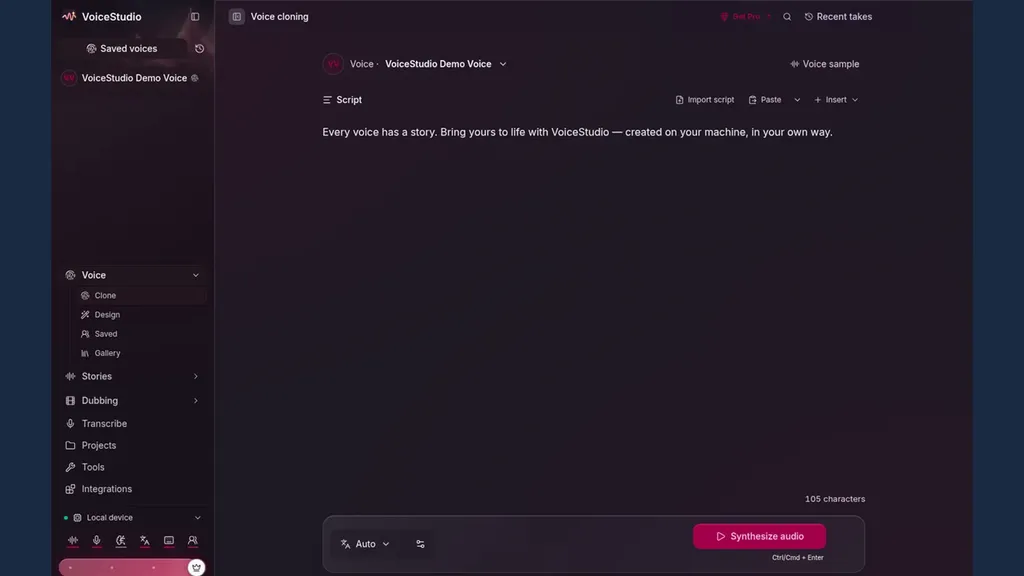
- In the left panel choose Voice → Clone.
- Record 10–15 seconds with your microphone or upload a recording. Speak clearly and with expression, because the clone picks up the way you speak in the sample.
- Record the sample in the language of your script. When the sample is in a different language, the voice gets a foreign accent.
- Type your text in the Script box, leave the language on Auto and click Synthesize audio.
Tip:Only clone your own voice or the voice of someone who agreed to it.
Step 7: Dub a video (optional)
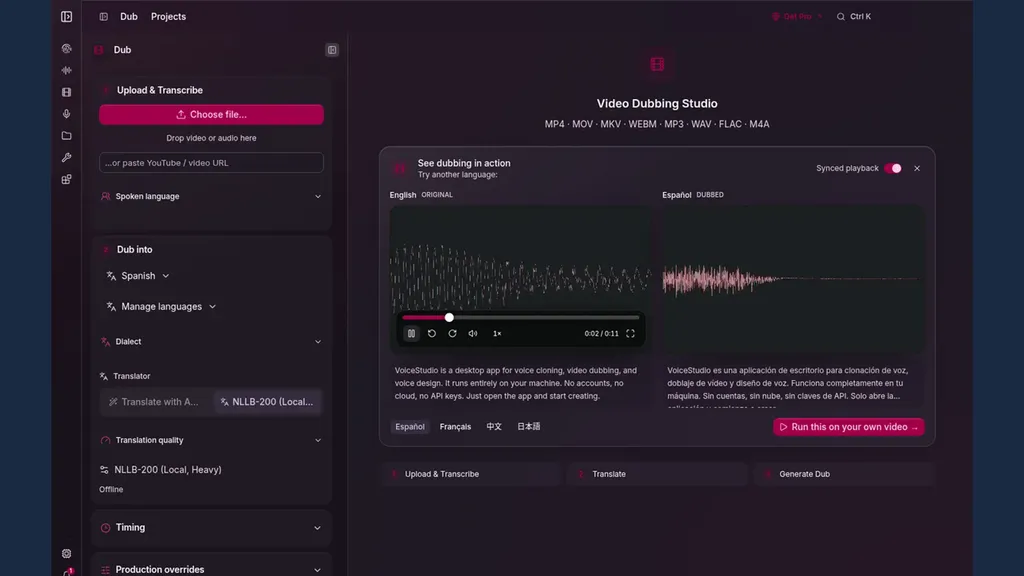
- Choose Dubbing, click Choose file or paste a YouTube link.
- In Dub into pick the target language. The NLLB-200 (Local) translator works offline.
- Start the dub. The app transcribes the speech, translates it and voices it in the new language with the same voice.
Tip:Start with a short clip. In a YouTube test, dubbing a whole podcast took about half an hour, and the app did not separate the two speakers, giving both the same voice.
Prompt
For step 4: copy all of it and paste it to your agent (Claude Code, Cursor or Codex). The prompt points to the official instructions from the VoiceStudio team and tells the agent to ask before every download.
Install the VoiceStudio desktop app (the Electron version) on this computer and check that it works.
Follow the official instructions for AI agents:
https://github.com/debpalash/VoiceStudio/blob/main/docs/install/agent.md

Rules:
- Write to me in plain English, without jargon.
- First check the computer: operating system, processor, graphics card, RAM and free disk space. Tell me whether VoiceStudio will run on it and whether it will be fast or slower.
- Install only the official release from https://github.com/debpalash/VoiceStudio/releases/latest and verify the checksum from SHA256SUMS.txt.
- Before downloading any model, tell me its size and license and ask for my consent.
- Do not answer the analytics consent question for me. Leave it to me.
- If you can't do something yourself (for example a system permission or a click is needed), tell me exactly what to click.
- Finally, generate a short voice sample, check that the file plays, and tell me: which version you installed, what the app runs on (graphics card or processor), where my files are and how to open the app next time.
If something doesn’t work
I have an Intel Mac
VoiceStudio cannot run locally on it, because the libraries it needs are no longer released for Intel. The app can connect to VoiceStudio running on another computer (details).
I don’t have an NVIDIA card
Everything runs on the processor, just slower. AMD cards and integrated graphics don’t speed up most engines on Windows (details).
macOS won’t open the app
Right-click VoiceStudio in Finder → Open. On macOS 15: System Settings → Privacy & Security → Open Anyway.
Dubbing takes very long or freezes
Split the video into shorter pieces. In a YouTube test a 10-minute video stopped without an error message, and dubbing a podcast took about half an hour.
Which languages does it support?
The OmniVoice engine covers more than 600 languages (full list). Creating a voice from a description (Voice Design) was trained mainly on English and Chinese, so in other languages it can be unstable. Cloning is the most reliable.
Can I use the recordings commercially?
The free version is under the AGPL-3.0 license. If your company needs a commercial license, the makers sell VoiceStudio Pro ($99 a year or $299 one-off, voicestudio.sh). Only clone your own voice or with the owner’s consent.
Want to do this with your team?
In our training sessions we show how AI tools for voice, video and content work inside a company, from the first install to a finished process.
Sources
- VoiceStudio on GitHub (debpalash/VoiceStudio)
- VoiceStudio: releases and installers
- Installing on Windows (documentation)
- Installing on macOS (documentation)
- Installing with an AI agent (documentation)
- OmniVoice: language list
- Samuel Gregory’s test (YouTube)
- Claude: pricing
- Cursor: pricing
- Codex: pricing
As of 25 October 2026, VoiceStudio version 0.5.6. Prices from the official websites, in US dollars, excluding VAT. AI GOATS is not affiliated with the makers of VoiceStudio, ElevenLabs, Anthropic, Cursor or OpenAI.